Choosing an Industrial Touch Screen Display supplier in 2026 takes more than comparing prices or browsing product photos. A screen beside a production line faces vibration, dust, changing temperatures, and repeated use by gloved hands. The right choice depends on where it will operate and how it connects to existing equipment. Details matter.
This guide compares suppliers through practical factors: display size and brightness, touch response, enclosure options, operating temperature, connectivity, customization, and after-sales support. Ask for specific test data and clear product documentation, not just broad claims about durability. A sample unit can reveal issues a specification sheet may miss, such as glare under factory lighting or slow input through protective gloves. Not every panel fits.
Supplier capabilities also vary by project. One may offer flexible engineering support, while another may provide a broader standard range or shorter quoted lead times. Those differences deserve verification. Check how the supplier handles prototypes, replacement parts, firmware updates, and technical questions after delivery. These details can shape total ownership costs as much as the initial price.
No single supplier is best for every application. A shortlist can still overlook a small but important requirement, especially when operating conditions are not fully documented. Use the comparisons ahead as a starting point, then confirm specifications, availability, and support directly with each company. A careful review helps buyers identify a suitable partner without treating rankings as guarantees.
What Is an Industrial Touch Screen Display?
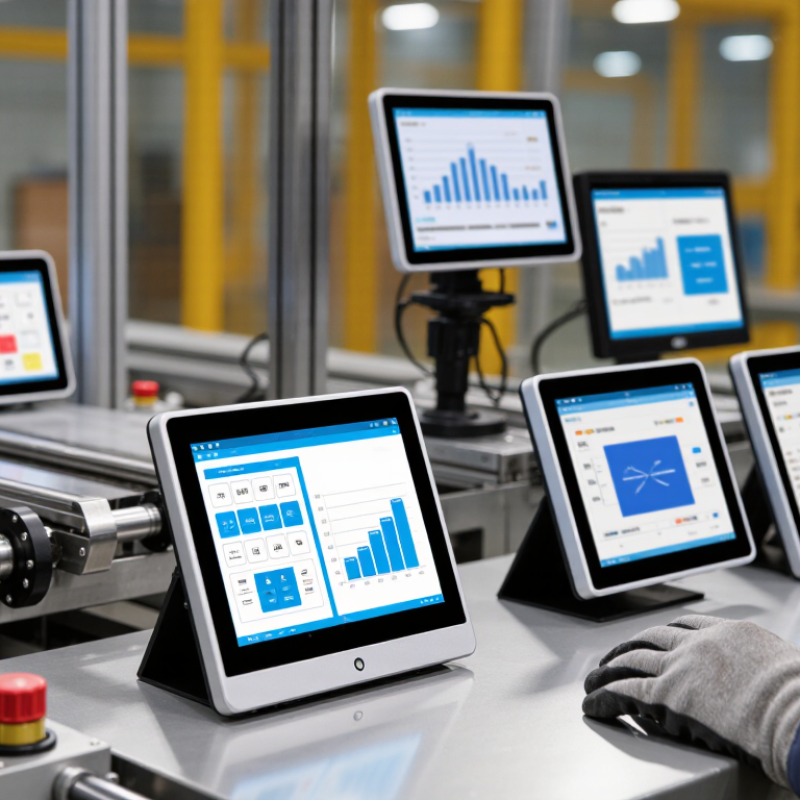
An industrial touch screen display combines a visual panel with a touch-sensing surface. Operators can read machine data and enter commands at the equipment. Unlike a typical office monitor, it is designed for repeated use around machinery, dust, vibration, temperature changes, or frequent cleaning.
That does not mean every model handles every condition. Some units are monitors connected to a separate computer; others include an embedded computer. Touch technology matters: projected capacitive screens support responsive multi-touch, while resistive designs may suit styluses or certain gloved workflows. Check the sensor’s actual glove support.
Installation details are practical, too. Measure the cutout, viewing distance, and mounting depth before comparing screen sizes. Check brightness against window glare, connectors against the control system, and enclosure ratings against the cleaning routine.
Ratings describe specific conditions, not every situation. A sealed front may not protect rear connectors. Ask for operating-temperature ranges, touch response with gloves, and documentation for the exact configuration. Specifications can be confusing, so verify them carefully.
A screen can look rugged and still be wrong for the job. That part is easy to overlook.
Which Technologies and Specifications Distinguish Industrial Displays?
2026 Best Industrial Touch Screen Display Suppliers?
Which Technologies and Specifications Distinguish Industrial Displays?
Industrial displays are judged by survival, not showroom brightness. Grand View Research estimated the global industrial display market at about USD 5.5 billion in 2023, with continued growth through 2030. That expansion reflects harsher automation environments. Buyers should examine operating temperatures, vibration tolerance, humidity resistance, and service life. A panel rated for 0°C to 50°C may fail near a furnace or cold dock. Wider ranges matter.
Projected capacitive touch supports gloves when properly tuned, while resistive touch remains useful with heavy gloves and pointed tools. Optical bonding improves contrast, reduces internal reflection, and limits dust pockets. For outdoor or window-facing equipment, 1,000 to 1,500 nits is often more practical than ordinary office brightness. Too much brightness can still create glare. A matte surface helps, but it may slightly reduce image sharpness.
Ingress protection should match the cleaning process. IEC 60529 ratings such as IP65 or IP66 indicate resistance to dust and water jets, not chemical durability. That distinction is frequently missed. EMC performance should also align with industrial immunity requirements under IEC 61000-6-2. Interact Analysis reported strong growth in industrial automation investment during 2024, increasing demand for reliable human-machine interfaces. Yet specifications alone cannot prove reliability. Field trials, touch latency checks, glove testing, and repeated cleaning tests remain essential. I would also question optimistic lifetime claims; real factories are less controlled than laboratories.
Industrial Touch Screen Display Specifications: Representative Brightness Levels
Higher luminance improves readability in bright industrial and outdoor environments.
Representative luminance categories commonly used when evaluating industrial displays: approximately 300 cd/m² for standard indoor panels, 1,000 cd/m² for high-brightness industrial panels, 1,500 cd/m² for sunlight-readable displays, and 2,500 cd/m² for enhanced outdoor visibility. Actual performance depends on optical bonding, anti-glare treatment, viewing angle, temperature, and ambient lighting.
Where Are Industrial Touch Screen Displays Commonly Used?
Industrial touch screen displays are common on factory production lines. Operators use them to monitor speed, temperature, pressure, and machine status. A bright screen beside a conveyor can show alarms without interrupting workflow. In dusty areas, sealed enclosures and glove-friendly controls matter. In food processing, smooth surfaces simplify cleaning and reduce trapped residue.
These displays also serve CNC machines, packaging equipment, and warehouse terminals. A warehouse worker may scan a carton, check inventory, and confirm a shipment on one panel. Outdoor equipment needs strong sunlight readability and wide operating temperatures. Medical production rooms often require durable glass and careful cleaning compatibility. Reliable suppliers should explain these specifications clearly, not hide them behind technical language.
Installation conditions can change the correct choice. A display that performs well in a clean factory may fail near vibration, moisture, or electrical noise. IP protection, mounting depth, viewing angle, and long-term component availability deserve practical testing. Touch accuracy can also drop when workers wear thick gloves. That assumption can fail. Field trials remain valuable, even when datasheets look convincing. Not every installation is perfect. Teams should record glare, response time, cleaning frequency, and operator feedback before approving a large purchase. This evidence supports a more dependable decision for 2026 industrial projects.
How Should Buyers Evaluate Suppliers in 2026?
How Should Buyers Evaluate Suppliers in 2026?
Choosing an industrial touch screen supplier requires more than comparing prices. Deloitte’s 2024 Smart Manufacturing and Operations Survey found that 86% of manufacturers view smart manufacturing as important for competitiveness. Displays must therefore support real production conditions, not showroom demonstrations. Check brightness under factory lighting, glove response, viewing angles, and operation during repeated cleaning. Ask for test evidence under IEC 60068 environmental conditions and verified IP protection ratings under IEC 60529.
Tips:
Request a sample unit before signing a large order. Test it beside your machine, not in an office. Record response delays, mounting pressure, cable routing, and screen readability at different angles. Review ISO 9001 certification, traceability procedures, repair timelines, spare-part availability, and firmware support. A supplier should explain component changes clearly. Vague answers deserve caution.
Forecasts from market research firms often show strong growth in industrial display demand, but their estimates vary because product definitions differ. That is easy to overlook. Buyers should compare warranty failure rates, lifecycle commitments, and total ownership costs instead of accepting market growth figures alone. Ask for references from similar temperatures, vibration levels, and shift patterns. Also inspect packaging and documentation quality. Small omissions can become expensive during installation. The best supplier is not always the cheapest or the largest. It is the one that can prove consistent performance, communicate limits honestly, and improve after a failed test.
Which Suppliers Lead the Industrial Touch Screen Display Market?
Which suppliers lead the industrial touch screen display market in 2026? The answer depends on more than panel volume. A 2024 industrial display market assessment estimates the sector could exceed USD 13 billion by 2030, with annual growth near 8%. Suppliers leading this expansion usually combine projected capacitive touch, wide-temperature operation, and long product lifecycles. They also support glove use, wet-finger input, and sunlight-readable screens.
The strongest candidates are specialized HMI manufacturers, embedded display integrators, and large-scale panel producers with industrial divisions. Procurement teams should examine failure rates, optical bonding quality, and replacement availability. A 2025 human-machine interface report identifies manufacturing, logistics, and medical equipment as major demand areas. In these environments, a display may face vibration, oil mist, repeated cleaning, and continuous operation. A bright screen alone is not enough.
Supplier reliability becomes clearer through evidence. Request thermal test results, ingress protection documentation, touch response data, and a five-year supply statement. The 2024 global touchscreen technology outlook reports that projected capacitive systems continue gaining share because they support multi-touch and sealed front surfaces. However, market forecasts differ noticeably. Some count automotive panels; others exclude them. That weakness deserves attention. A low quoted price can hide tooling changes, limited firmware support, or an unavailable replacement panel. Experienced buyers should test samples during real shifts, not only in a showroom.
FAQS
It combines a visual panel and touch surface, letting operators read machine data and enter commands near equipment. It is built for repeated use around dust, vibration, and cleaning. Not every model handles every condition.
Projected capacitive touch offers responsive multi-touch and may work with gloves when properly tuned. Resistive touch can suit heavy gloves or pointed tools. Test the exact gloves used on the factory floor.
Compare operating-temperature ranges with the actual workspace, such as a cold loading dock or a hot production area. Also check vibration and humidity tolerance. A wide range matters.
For outdoor or window-facing equipment, 1,000 to 1,500 nits may be practical. Check the screen from the operator’s viewing position. High brightness can still create glare.
These ratings describe resistance to dust and water jets under specified conditions. They do not confirm chemical durability. A sealed front may also leave rear connectors exposed.
Optical bonding can improve contrast, reduce internal reflections, and limit dust pockets inside the display. A matte surface may help with glare, but can slightly soften image sharpness.
Measure the panel cutout, viewing distance, and mounting depth. Check connector compatibility and enclosure ratings against the cleaning routine. This is easy to overlook.
Run field trials, check touch latency, test gloves, and repeat the cleaning process. Ask for documentation for the exact configuration. I may be cautious, but lifetime claims deserve a closer look.
Conclusion
An Industrial Touch Screen Display is a rugged visual interface designed to support reliable operation in demanding environments such as factories, warehouses, transportation systems, healthcare facilities, and outdoor equipment. Compared with standard commercial screens, it typically offers stronger enclosures, wider temperature tolerance, improved resistance to dust, moisture, vibration, and impact, as well as long-term operational stability. Key technologies and specifications include projected capacitive or resistive touch systems, high-brightness panels, wide viewing angles, anti-glare surfaces, customizable sizes, multiple connectivity options, and compatibility with gloves or industrial tools.
When evaluating suppliers in 2026, buyers should consider display performance, touch accuracy, durability certifications, customization capabilities, product lifespan, software and hardware compatibility, quality control, delivery reliability, technical support, and total ownership cost. Leading suppliers are distinguished not only by advanced display technology but also by their ability to provide consistent production, flexible integration, lifecycle support, and solutions tailored to specific industrial applications.

 Xiangrui Optoelectronics