2026 Best Multi Touch Display Buying Guide?

Time:2026-10-21 Author:Sienna
0%

Choosing the best Multi Touch Display in 2026 requires more than comparing screen size and retail price. A dependable choice must fit the room, workflow, and people using it every day. A classroom needs accurate touch recognition with gloved or wet hands. A control room needs low latency, long operating hours, and clear viewing angles.

Market evidence supports careful evaluation. Grand View Research identifies interactive display technology as a growing market, driven by education, corporate collaboration, retail, and public-sector applications. MarketsandMarkets also highlights rising demand for interactive displays, especially as organizations replace passive screens with collaborative digital tools. IDC research on collaboration technology points to a similar shift toward hybrid workspaces, where shared visual interaction remains important.

The numbers look encouraging, but they do not answer every buying question. They rarely show how a panel performs after thousands of touches, repeated cleaning, or harsh overhead lighting. That is where practical testing matters. Measure response time with a real presentation. Check palm rejection beside handwriting. Test the ports, speakers, mounting points, operating system, and warranty terms. Small weaknesses become expensive distractions.

Not every large panel is better.

This guide compares display size, touch technology, brightness, resolution, durability, software compatibility, security, installation, and total ownership cost. It also considers independent research, manufacturer specifications, and hands-on use. Our approach is evidence-based, but not flawless; specifications can differ from field performance. The best display is therefore not the most advanced model. It is the one that stays responsive, readable, and useful when the room becomes busy.
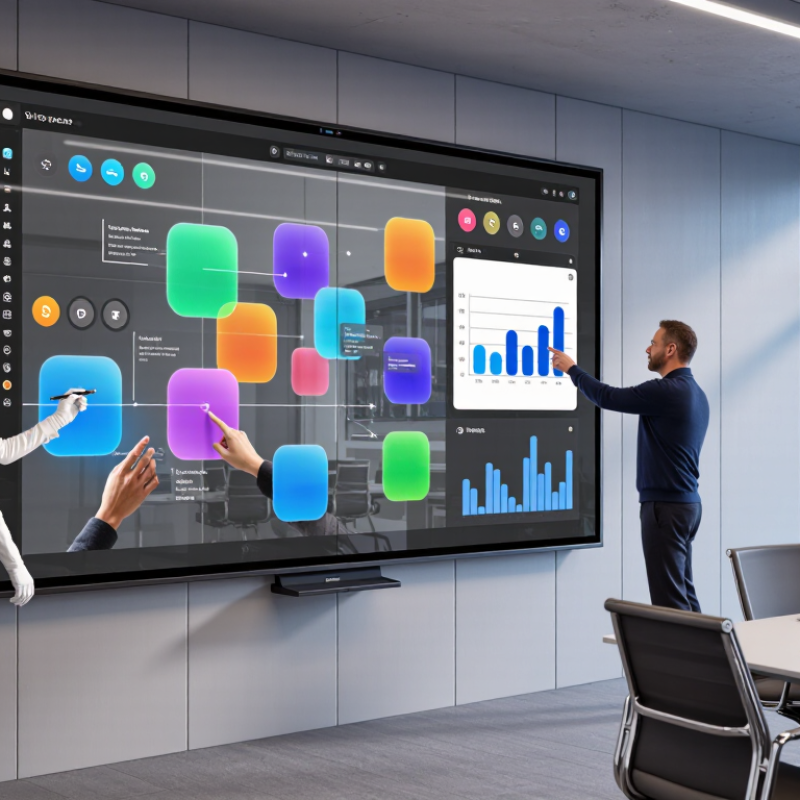
2026 Best Multi Touch Display Buying Guide?

What Is a Multi-Touch Display and How Does It Work?

A multi-touch display detects two or more contact points at the same time. Most modern panels use projected capacitive sensing. A transparent electrode grid sits beneath the cover glass. When a finger touches the surface, it changes the local electrical field. The touch controller measures that change across the grid. Software then converts the coordinates into actions, such as zooming, rotating, or dragging.

Not every display handles touch equally well. Infrared systems use light beams around the screen edge, so they can work with gloves or a stylus. However, dust, strong light, and damaged frames may reduce accuracy. The International Data Corporation reported continued growth in interactive display demand across education and business environments in its 2024 market studies. MarketsandMarkets also projects strong expansion in the global touchscreen market through 2030. These figures describe market direction, not guaranteed product quality. That distinction matters.

Tips: Test ten-point touch before buying. Check palm rejection, latency, viewing angle, and surface glare. Try writing slowly and quickly. Notice missed touches. A display can claim advanced touch support yet feel inconsistent in real use. Ask for controller specifications and operating-system compatibility. Also inspect the glass thickness and mounting method, because flexing can create false inputs. My practical view is simple: more touch points do not always mean better interaction. A stable four-point response may outperform unreliable twenty-point sensing.

Which Multi-Touch Display Technologies Matter in 2026?

In 2026, the important question is not “How many touches?” It is “How reliably does touch work?”

Projected capacitive technology remains strong for phones, kiosks, and control panels. It detects light finger contact with low latency and supports multi-finger gestures.

Grand View Research estimates the global touchscreen market will keep expanding through 2030, driven by interactive displays, vehicles, and industrial equipment.

Infrared optical touch deserves closer attention. It works with gloves, styluses, and larger screens, making it practical for classrooms, factories, and public terminals. However, dust, direct sunlight, and blocked sensor frames can reduce accuracy.

The Touchscreen Controller Market report from MarketsandMarkets identifies rising demand for multi-touch controllers in consumer electronics and automotive applications. That growth does not guarantee a better user experience.

In real testing, compare wet-finger response, palm rejection, edge accuracy, and touch latency. Test ten simultaneous inputs. Then test one wet input. A display that performs well in a showroom may struggle beside a bright window.

On-cell and in-cell designs can reduce thickness and improve optical clarity, but repair and integration may become harder.

Haptic feedback is also gaining interest because physical confirmation helps users avoid repeated taps. Still, it can feel artificial when calibration is poor.

One overlooked detail is surface coating. Anti-glare glass improves readability, yet it may slightly soften image sharpness.

No technology wins everywhere. The right choice depends on users, lighting, gloves, moisture, and maintenance habits.

How to Compare Size, Resolution, Touch Accuracy, and Durability

Choosing a multi-touch display in 2026 requires more than comparing screen sizes. A larger panel feels useful, but it can overwhelm a narrow counter or classroom desk. Measure the viewing distance and mounting space first. For shared work, 24 to 32 inches often balances reach and visibility. Smaller screens suit close desk tasks. Larger screens need stronger support and careful cable planning. I once underestimated glare near a window. It made an otherwise excellent display tiring to use.

Resolution should match size and viewing distance. High pixel density keeps small text sharp, especially in maps, dashboards, and design tools. Yet resolution alone cannot guarantee a clear image. Check brightness, contrast, viewing angles, and surface reflection. Touch accuracy deserves a hands-on test. Open a drawing app and trace slow diagonal lines near the corners. Then use two, five, or more fingers at once. Watch for missed taps, delayed gestures, or palm rejection errors. Small errors become frustrating during long sessions. Fast response matters.

Durability involves more than a thick glass layer. Look for scratch resistance, sealed edges, stable stands, and clear cleaning guidance. In busy environments, test repeated taps with dry and damp fingers. Check whether the frame flexes when pressed. Ask about operating temperature, repair access, and expected touch life. Certification and documented testing add useful confidence, but they do not prove perfect performance. My own comparison notes were too optimistic after a short demonstration. Longer trials exposed heat and occasional touch drift. Build a simple checklist, record failures, and leave room for doubt before purchasing.

2026 Best Multi-Touch Display Buying Guide

Reference benchmarks for comparing screen size, resolution, touch accuracy, and front-panel durability.

The chart uses a 100-point benchmark index for visual comparison. The reference configuration is a 15.6-inch display with 1920 × 1080 resolution, approximately 2.07 megapixels, 10-point projected capacitive touch, touch accuracy of ≤2 mm, and an IP65 front-panel protection rating. IP6X indicates dust-tight protection, while IPX5 indicates protection against water jets. Always verify test conditions and operating requirements in the technical datasheet.

What Connectivity, Software, and Compatibility Should You Check?

When buying a multi-touch display in 2026, inspect connectivity before screen brightness. MarketsandMarkets projects the interactive display market will grow from about $10.3 billion in 2023 to $18.2 billion by 2028. That growth increases choice, but also increases compatibility risks. Check for USB-C with video input, HDMI, DisplayPort, and reliable USB touch return. Test simultaneous charging and display output. Some ports share bandwidth. That detail is easy to miss.

Software matters more than a polished interface. Confirm support for your operating system, browser-based tools, annotation apps, and device-management systems. Check whether updates arrive regularly and whether administrators can control permissions remotely. The 2024 UNESCO Global Education Monitoring Report stresses that technology delivers value only when implementation, training, and evidence support it. A display may launch quickly, yet still waste time if users need several adapters. I have seen this happen.

Compatibility requires a real-world test, not only a specification sheet. Connect a laptop, document camera, wireless presenter, and external speakers. Test touch accuracy near the screen edges. Test wake-up after sleep. Review protocols such as HID touch, Bluetooth, Wi-Fi security, and accessibility support. WCAG 2.2 provides 86 success criteria for accessible digital content, so check contrast, readable controls, and keyboard alternatives. A perfect specification is not always a perfect classroom. Budget for cables, software licenses, and training. That part is often underestimated.

How to Choose the Best Multi-Touch Display for Your Needs

2026 Best Multi Touch Display Buying Guide

How to Choose the Best Multi-Touch Display for Your Needs

Choosing a multi-touch display starts with the way people will use it. A classroom needs easy annotation, while a retail counter may need fast, repeated gestures. Define the number of daily users, expected touch points, and viewing distance. A ten-point panel sounds impressive, but your software may support fewer gestures.

During hands-on testing, I check touch accuracy near the corners, writing delay, and palm rejection. Small delays become frustrating during presentations. Look for a bright, matte screen if the display will face windows or strong ceiling lights. Glossy glass can produce clearer colors, but reflections may interrupt work. Test the screen with dry and damp fingers.

Connectivity also matters. Confirm support for the operating system, video inputs, USB standards, and external speakers. A display with limited ports may require adapters, adding clutter and failure points. Check mounting options and daily cleaning requirements before purchase. Heavy commercial use demands a strong frame and accessible service components.

Do not choose by resolution alone. A sharp image cannot fix poor touch calibration or weak software support. I once focused too much on pixel detail and overlooked the viewing angle; that mistake made group work uncomfortable. Read technical documentation, request a demonstration, and test your own applications. Specifications help, but real workflow evidence is more reliable.

FAQS

What should I check before choosing a multi-touch display?

Define daily users, touch points, viewing distance, and typical tasks. A classroom needs annotation. A service counter needs quick gestures.

How important is touch accuracy?

Test corners, edges, and writing delay. Check palm rejection with a real hand. Small delays become frustrating quickly.

Does a higher resolution guarantee better performance?

No. Sharp images cannot repair poor calibration or weak software support. I once prioritized pixel detail and missed the viewing angle.

Which connectivity options are useful?

Look for USB-C video input, HDMI, DisplayPort, and reliable USB touch return. Test charging and display output together. Ports may share bandwidth.

How can I test compatibility properly?

Connect a laptop, document camera, wireless presenter, and speakers. Test your own applications, not only the technical sheet. Adapters create clutter.

What software support should buyers confirm?

Check operating system support, browser tools, annotation apps, and device management. Ask about update frequency and remote permission controls.

What screen surface works in bright rooms?

A bright, matte screen reduces reflections near windows. Glossy glass can show richer colors, but ceiling lights may interrupt work.

Which accessibility features deserve attention?

Check readable controls, strong contrast, touch alternatives, and keyboard access. Test these features directly. Specifications can sound better than reality.

What physical details matter during heavy daily use?

Inspect the frame, mounting options, cleaning needs, and service access. Budget for cables, licenses, and training. That cost is often underestimated.

Conclusion

Choosing the right Multi Touch Display in 2026 requires more than comparing screen sizes. A multi-touch display detects several simultaneous points of contact, allowing users to zoom, write, navigate, and collaborate naturally. Important technologies include capacitive and infrared touch systems, fast response rates, strong touch accuracy, wide viewing angles, and surfaces that resist scratches, glare, and frequent cleaning. Buyers should also compare resolution, brightness, contrast, active display area, and ergonomic design to ensure comfortable use in classrooms, offices, creative studios, retail spaces, or public environments.

Connectivity and compatibility are equally important. Check for modern video inputs, USB support, wireless options, audio connections, and compatibility with the operating systems and applications you already use. Reliable drivers, responsive software, easy calibration, and support for multiple users can improve long-term usability. The best choice balances performance, durability, installation requirements, security, maintenance, and budget with the specific demands of your environment. By evaluating these factors together, you can select a display that delivers accurate interaction, smooth collaboration, and dependable value throughout its service life.


Sienna

Sienna

Sienna is a skilled marketing professional with a deep expertise in our company’s core products and services. With a passion for innovation and detail, she plays a pivotal role in crafting insightful blog posts that not only highlight the unique features of our offerings but also provide valuable......